
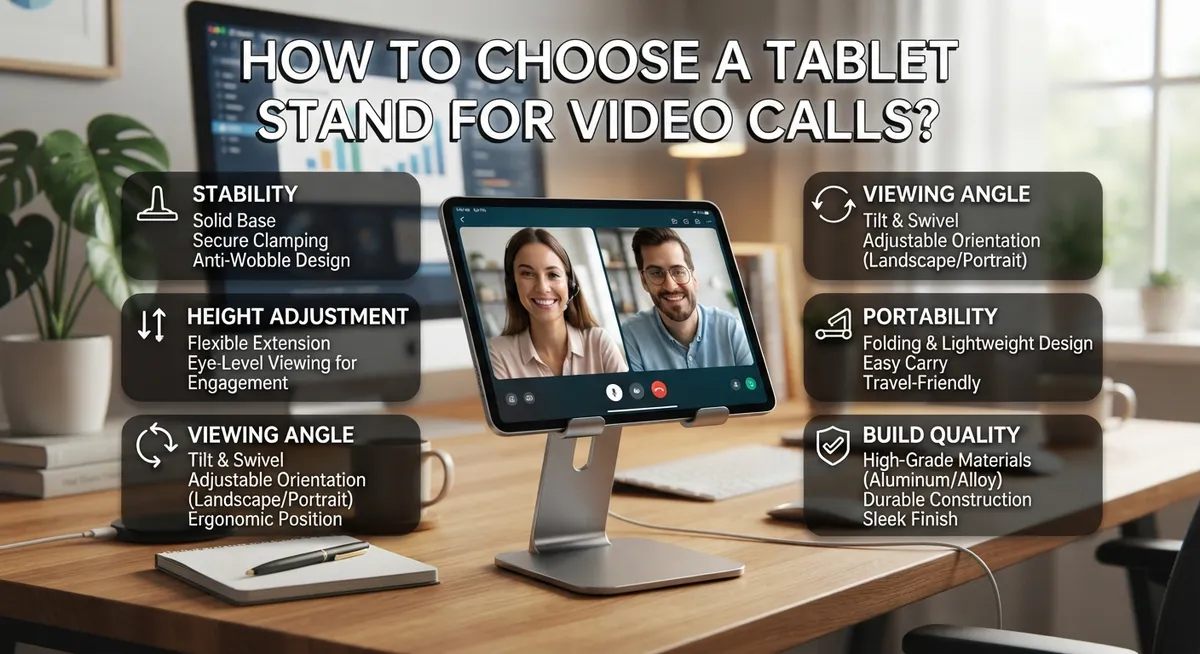
How to Choose a Tablet Stand for Video Calls?
Video calls happen everywhere now. Work meetings, family chats, online classes. Your tablet becomes a window to connect with others.
But holding a tablet for long calls hurts your arms. Your camera angle looks awkward too. A good tablet stand fixes both problems fast.
Not every stand works for every tablet. Some hold small 7 inch devices. Others support larger 13 inch tablets up to 1.2 kg. Picking the wrong size means wobbling and slipping during important calls.
Your stand also needs the right adjustability. This lets you set the perfect camera angle for eye level video chats. Without this feature, you end up staring down at your device.
This guide walks you through everything you need to know. We cover how to match a stand to your tablet size. We explain why your primary use case matters most. You will also learn common mistakes people make when buying stands.
By the end, you will know exactly what to look for. Choosing the right tablet stand becomes simple and stress free. Your next video call will feel more comfortable and professional.
In a Nutshell
Picking the right tablet stand comes down to a few key choices. Here is a quick summary to help you decide fast.
-
Know your tablet’s size and weight. Most stands support devices between 7.9 and 13 inches. Check your tablet’s specs before you buy anything.
-
Think about where you will use it most. Desk, bed, kitchen, or car each need different stand features. Your main use case shapes everything else.
-
Look for adjustability. A good stand lets you tilt and rotate your tablet. This helps you find the perfect camera angle for calls.
-
Check weight capacity. Stands typically hold up to 1.2 kg. Make sure your tablet, plus its case, fits within that limit.
-
Confirm port and camera access. Some stands block charging ports or cover the camera. Test this before committing to a purchase.
-
Avoid one size fits all thinking. A stand labeled “universal” may not actually work with your case or tablet model. Always verify compatibility first.
Keep these points in mind and you will find a stand that keeps your tablet steady and your calls smooth.
Understanding Tablet Stands and How They Support Video Calls
Tablet stands come in several distinct types, each designed to meet different needs during video calls. Understanding these varieties helps you pick the right one for your situation.
Desktop stands sit on tables or desks and provide stable support. They typically feature adjustable angles so you can position your tablet at eye level during calls. This setup works best when you stay in one location and want hands free use. Many desktop stands have a weighted base that prevents tipping.
Floor stands reach higher and work well for bed use or when you need to view your tablet from a distance. These stands often have telescoping poles that extend upward. They give you flexibility to move around while staying visible on camera. Floor stands handle the same weight range as desktop models but require more floor space.
Bed stands clip or grip onto headboards or furniture. They hold your tablet securely while you recline. This type works great for longer calls when you want to relax. The grip mechanism must be strong enough to prevent your device from falling.
Car mounts attach to dashboards or air vents. They keep your tablet visible during video calls while driving. Safety matters here, so choose one that doesn’t obstruct your view of the road.
Multi location stands work across several environments. These portable options fold up easily and travel well. They sacrifice some stability for convenience but still support proper video call positioning.
Each stand type supports tablets between 7.9 and 13 inches and handles up to 1.2 kg. The key difference lies in where and how you use them. Think about your primary location first. This choice determines which stand type makes the most sense. Your daily routine shapes whether you need something stationary or portable. Once you know your main use case, selecting the right stand becomes much simpler.
Identifying Your Primary Use Case and Location
Your primary use case is the foundation of your entire decision. Before you spend time comparing stands, ask yourself where you will actually use your tablet most often during video calls.
Think about your daily routine. Do you take calls at your desk while working? Do you video chat in bed before sleep? Do you need your tablet in the kitchen while cooking? Do you travel frequently and need something portable? Each location demands different features from your stand.
A desk setup requires stability above all else. Your stand should sit firmly on a hard surface and prevent wobbling when you tap the screen or adjust the camera angle. Desktop stands typically offer the most secure foundation for professional video calls.
Bed use is completely different. You need a stand that grips your headboard or mattress edge without slipping. The angle matters too since you will be viewing from a reclined position. Your camera angle must capture your face clearly, not just the ceiling.
Kitchen or dining situations call for flexibility. Your stand should position the tablet at eye level so you can see recipes or video chat while keeping your hands free. Spill resistance becomes important here.
Car mounting requires secure attachment to prevent movement during driving. Your stand must work with your vehicle’s interior without blocking your view of the road.
Identify whether you need one stand for a single location or multiple stands for different places. Many people find it practical to keep a stand at their desk and another in their bedroom. Others prefer one adjustable stand they move around.
Once you know your primary location, you can evaluate which stand type fits best. Desktop stands excel at desks. Bed stands work for bedroom calls. Portable stands suit people who move between locations. Knowing where you will use your tablet most eliminates confusion and helps you choose a stand with the right features for your needs.
Checking Tablet Size and Weight Compatibility
Before you buy a tablet stand for video calls, you need to know two critical things: your tablet’s exact size and its weight. This information determines whether a stand will actually work for your device.
Start by finding your tablet’s screen size. Most tablets range from 7 inches to 13 inches diagonally. Check your device’s manual or settings to confirm the exact measurement. This matters because stands have specific size ranges they support safely.
Next, weigh your tablet. Use a kitchen scale or bathroom scale to get an accurate number. Most tablet stands handle devices up to 1.2 kg without slipping or tipping. If your tablet weighs more, you need a stand with stronger gripping power.
Don’t forget to measure your tablet with its case on. Cases add thickness and sometimes width. A stand that fits your bare tablet might not work once you add protection. This is a common mistake people make when shopping.
Check the stand’s specifications against your measurements. Look for minimum and maximum size ranges listed by the manufacturer. Match your tablet size to those numbers exactly. A stand rated for 7 to 10 inches won’t grip an 11 inch tablet properly.
Weight capacity matters just as much as size. Even if your tablet fits the width, an undersized stand might wobble if your device is heavier than expected. This creates serious problems during video calls when you need steady framing.
Consider your tablet model too. iPad models, Samsung tablets, and other brands have slightly different dimensions. Two 10 inch tablets from different makers may have different weights or thicknesses. Always verify compatibility with your specific model, not just the screen size.
Once you confirm size and weight compatibility, you can confidently move forward with other selection criteria. This foundation prevents wasted money and frustration later.
Evaluating Adjustability for Ideal Camera Angles
Your tablet’s camera angle during video calls directly impacts how others see you. A stand that doesn’t adjust properly can make you look unflattering or hard to see. Adjustability is essential for getting the right perspective.
Start by testing angles before you commit to any stand. Position your tablet at eye level, slightly above it, or tilted downward. Notice which angle makes you look most natural and professional. Most people find eye level or slightly above works best for video calls.
Check if the stand offers tilt adjustment. Tilt lets you angle the screen up or down without moving the entire stand. This feature saves you from constantly repositioning. Some stands tilt just 15 degrees, while others offer 45 degrees or more. Greater tilt range gives you more flexibility.
Look for stands with rotating capabilities too. Rotation lets you switch between portrait and landscape mode quickly. Video call apps often work better in portrait mode, but you might want landscape for viewing multiple participants or sharing content.
Dual hinge designs provide excellent flexibility. These stands have two pivot points that move independently. You can adjust height, angle, and rotation all separately. This means you can fine tune your camera position for any situation.
Test the adjustment mechanism’s stability. Adjustable stands should hold their position firmly without slipping. Wobbly adjustments ruin your video call appearance. The mechanism should feel smooth but secure when you move it.
Consider how easily you can make adjustments. If you take multiple calls daily, quick angle changes matter. Some stands require two hands to adjust, while others move with one hand. Frequent adjusters benefit from simpler mechanisms.
Verify that adjustments don’t block your tablet’s camera or ports. Moving the stand shouldn’t cover your camera lens or charging port. Check this before purchasing. Your case thickness affects this too, so test with your actual tablet and case on.
Ensuring Port and Camera Access With a Case On
When you place your tablet in a stand, a protective case often stays on the device. This means the stand must work around your case without blocking critical features. Port and camera access matter most for video calls, so checking this compatibility is essential before making your choice.
Start by identifying all the ports on your tablet. Most tablets have charging ports on the bottom or sides, headphone jacks, and sometimes SD card slots. Your case covers these areas, so the stand’s grip points must not press against them. Take your tablet with its case on and test how the stand holds it. Press gently on the grip areas to ensure nothing blocks your ports.
Your tablet’s camera is equally important for video calls. Front facing cameras sit at the top of most tablets, while rear cameras are on the back. Check that the stand’s frame or arms don’t cover these camera lenses. Move your tablet slightly within the stand’s grip and confirm the camera has a clear view. Even partial obstruction ruins video call quality.
Case thickness creates a real challenge here. Thicker cases take up extra space inside the stand’s grip. Some stands accommodate thick cases easily, while others only fit slim cases. Measure your tablet’s thickness with the case on, then compare it to the stand’s grip width specifications. Many stands list their maximum case thickness, so use this number as your guide.
Test the grip mechanism too. Rubber pads, silicone arms, or foam inserts hold your tablet securely. Make sure these don’t press into ports or camera areas. Adjustable grips work best because you can position them to avoid sensitive components. Spin your tablet slightly within the stand to verify nothing shifts and blocks access.
Take time to physically inspect stands before committing. This hands on approach prevents frustration later and ensures your video calls stay crystal clear.
Step-by-Step Guide to Selecting the Right Stand
Selecting the right tablet stand for video calls requires a systematic approach. Start by identifying your primary use location, as this decision shapes everything else. Will you use the stand at your desk, on your bed, in your kitchen, or in multiple places? Your answer determines which stand type works best for your needs.
Next, gather your tablet’s exact specifications. Measure your screen size in inches. Weigh your device. Then measure it again while wearing its protective case, since the case adds thickness and width. Most tablet stands support devices between 7.9 and 13 inches and handle up to 1.2 kilograms.
Check the stand’s weight capacity against your measurements. A stand rated for 1 kilogram won’t safely hold a heavier tablet. Undersized stands create instability and risk dropping your device during important calls.
Test the stand’s adjustability features before purchasing. Look for tilt adjustment options that let you change the vertical angle. Rotating capabilities help you switch between portrait and landscape modes. Dual hinge designs offer excellent flexibility for different viewing positions.
Verify that the stand’s grip mechanism accommodates your tablet’s thickness with the case attached. Open the stand fully and check if your device fits without forcing it. Poor fit causes slipping and damage.
Confirm that the stand’s design doesn’t block your camera or charging ports. Position your tablet in the stand and look through the camera lens from the back. Try accessing your charging port and headphone jack if you use one. Some stands have cutouts or open designs that prevent obstruction.
Test the adjustment mechanism’s stability during your inspection. Loose or wobbly adjustments defeat the purpose of a stand. The stand should hold your tablet firmly in any position you set it.
Take time to physically handle different stands if possible. Your comfort with the adjustment process matters for regular use during video calls.
Common Mistakes to Avoid When Choosing a Tablet Stand
People make several common mistakes when picking a tablet stand for video calls. Understanding these errors helps you avoid wasting money and frustration.
Choosing the wrong size is the most frequent mistake. You might buy a stand designed for smaller tablets, then find your device slips around inside it. Conversely, oversized stands won’t grip your tablet securely. Always verify the exact size range your stand supports before purchasing.
Assuming “universal” stands work for everything leads to disappointment. A universal stand might claim to fit all tablets, but your protective case could block charging ports or the camera. The stand’s grip might not accommodate your case’s thickness. Test compatibility with your specific setup, not just the bare tablet.
Ignoring case thickness causes major problems. Your tablet probably stays in a case for protection. That case adds bulk. A stand that barely fits your naked tablet won’t hold it safely once the case is on. Measure your tablet’s thickness while it’s in its case, then compare that measurement to the stand’s grip opening.
Overlooking stability during adjustments creates safety risks. Some stands feel stable when locked in one position but wobble when you tilt or rotate them. Your tablet could fall during a video call. Test the adjustment mechanism thoroughly to ensure it stays firm at different angles.
Neglecting to check camera access ruins your video calls. The stand’s grip or frame might partially block your front-facing camera. You’ll appear off-center or partially hidden to other callers. Verify that your camera has a clear line of sight when your tablet sits in the stand.
Picking stands without trying them first means you won’t discover fit issues until it’s too late. Handle different stands in person if possible. This hands-on approach reveals problems that product descriptions miss. You’ll feel confident your choice actually works for your needs.
Final Thoughts
Choosing the right tablet stand for video calls comes down to a few key details. Your tablet’s size and weight matter most. Always match these specs before buying anything.
Think about where you will use the stand most often. A desk setup needs different features than a bedside or kitchen counter setup. Your primary use case shapes every other decision.
Adjustability is not optional for good video calls. You need a stand that lets you set the right camera angle. Without this, you will look awkward on every call.
Port and camera access can make or break your experience. A stand that blocks your charging port becomes frustrating fast. Always check this before you commit to a purchase.
Case thickness deserves real attention too. Many stands work fine with bare tablets but fail with a case attached. Test this combination whenever possible.
Stability protects your device from damage. A wobbly stand risks drops and scratches. Solid grip and balanced design keep your tablet safe during long calls.
Remember that no single stand works for everyone. Your needs differ from someone else’s setup. This is why physical testing helps so much.
Take your time during the selection process. Rushing leads to mistakes you will regret later. A few extra minutes of research saves future headaches.
Keep these core points in mind: size compatibility, weight limits, adjustability, and port access. These four factors cover most concerns buyers face.
The right stand transforms your video call experience completely. You get better angles, steadier footage, and easier access to your device. This small investment pays off daily.
Choose wisely, and your tablet stand will serve you well for years. Focus on your specific needs first. Everything else follows from that clear starting point.
Frequently Asked Questions
Can I use a phone stand for my tablet?
No, phone stands won’t work well for tablets. Phone stands support devices weighing 200 to 300 grams. Tablets weigh up to 1.2 kg, which is four times heavier. A phone stand will tip over or collapse under your tablet’s weight. Tablet stands have stronger frames and wider grip areas to handle the extra load safely.
What if my tablet is in a thick protective case?
Always measure your tablet’s thickness with the case on. Many stands grip devices between 7 and 13 millimeters thick. A thick case might make your tablet too wide for the stand’s grip mechanism. Test the fit before buying. Some stands have adjustable arms that open wider to fit bulky cases. Check that the case doesn’t block your camera or charging port once the tablet sits in the stand.
Do I need an adjustable stand for video calls?
Yes, adjustability matters for video calls. You need to angle your tablet so the camera points at your face, not your ceiling or floor. A fixed stand locks your tablet in one position. Adjustable stands let you tilt and rotate to find the perfect camera angle. This prevents unflattering shots and improves how others see you on the call.
Will the stand block my tablet’s ports or camera?
This depends on the stand’s design. Some stands grip the sides, leaving the top and bottom open. Others grip from the back, potentially covering ports. Before purchasing, confirm the stand’s grip location. Check if it blocks your charging port, headphone jack, or rear camera. Test with your actual tablet model and case combination if possible.

DK is a tech enthusiast and product reviewer dedicated to helping readers explore the ever-evolving world of technology. With a passion for testing gadgets, apps, and appliances, DK delivers honest, in-depth reviews and practical buying guides to make your tech decisions easier.


