How to Pick a Powerline Kit for Gaming in Another Room?
Gaming in a room far from your router feels frustrating. Your WiFi signal drops. Your ping spikes at the worst moments.
A powerline kit can fix this problem. It uses your home’s electrical wiring to send internet data from one room to another.
This method skips WiFi dead zones completely. It creates a wired-like connection through your walls.
Picking the right kit matters a lot. Not every powerline adapter works well for gaming. Some homes have wiring that limits performance.
This guide walks you through everything you need to know. We cover how powerline kits work and what steps you follow to set them up.
You will learn what factors affect performance in your home. We also explain common mistakes people make during installation.
Your home’s age and wiring quality play a big role in how well these kits perform. We break down what to check before you buy anything.
By the end, you will know exactly what to look for. You will understand how to test your setup and avoid frustrating surprises.
Let’s help you build a stable connection for smoother, lag free gaming sessions in any room.
In a Nutshell
Powerline kits use your home’s electrical wiring to send internet signals. They connect two adapters, one near your router and one in your gaming room.
Here’s what you need to remember before buying one:
- Plug adapters directly into wall outlets. Power strips and surge protectors block the signal and cause slowdowns.
- Check your home’s build year. Homes built after 2012 usually have better wiring for strong performance.
- Look at throughput specs. Higher numbers mean smoother gameplay with less buffering during streaming or gaming.
- Pairing matters. Follow the button press steps correctly, or your adapters won’t talk to each other.
- Test before you commit if you can. Wiring quality varies a lot between houses, even similar ones.
- Keep expectations realistic. Older or tricky wiring might limit how much a kit can help, no matter how good it is.
A powerline kit won’t guarantee zero ping, but it often creates a stable, wired feeling connection. This makes it a solid choice for gamers stuck in WiFi dead zones.
What Is a Powerline Adapter Kit and How Does It Work?
A powerline adapter kit uses your home’s electrical wiring as a data highway. Instead of relying on WiFi signals through the air, these kits send internet data through the cables already running inside your walls.
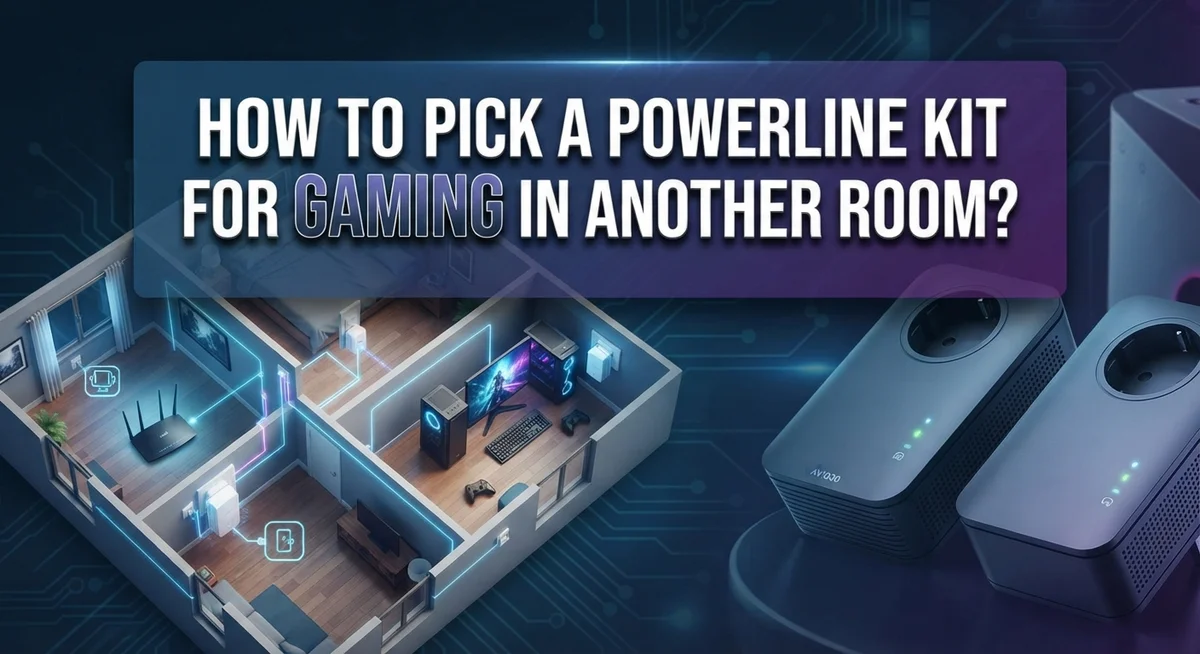
Here’s how it works in simple terms. You get two units in a kit. The first unit (called the transmitter) plugs into a wall outlet near your router. You connect this unit to your router using an Ethernet cable. The second unit (called the receiver) plugs into a wall outlet in the gaming room where you want internet access.
Once both units are powered on, they communicate with each other through your home’s electrical system. This happens automatically in most cases, though you may need to press a pairing button to connect them. After pairing, you can plug an Ethernet cable from the receiver unit directly into your gaming console or computer.
The beauty of this setup is that it bypasses WiFi problems entirely. Your gaming device gets a wired connection without needing cables running across your home. This typically means lower ping and more stable speeds compared to WiFi from a distant router.
The key point: powerline adapters turn your electrical wiring into an internet delivery system. This works because electrical wiring reaches almost every room in your house. Since the connection is wired (not wireless), you get the reliability benefits of a direct Ethernet connection without the hassle of running cables everywhere.
The entire setup takes just a few minutes. No technical skills are required. You simply plug, connect, pair, and start gaming with a stronger, more stable connection in your chosen room.
Why Powerline Kits Matter for Gaming in Rooms With Weak WiFi
Weak WiFi in your gaming room kills your experience. Buffering, lag spikes, and disconnects make every session frustrating. A powerline kit fixes this by using your home’s electrical wiring instead of WiFi signals.
Why this matters for gaming: WiFi travels through walls, furniture, and air. The farther you are from your router, the weaker the signal gets. Powerline adapters skip this problem entirely. They send data through your electrical system, which reaches every room in your home.
Gaming demands stable, consistent connections. WiFi can fluctuate based on interference, distance, and obstacles. Powerline kits provide a wired connection feeling without running cables through your walls. This means fewer dropped packets and more predictable performance.
Your ping often improves with a powerline setup. Wired connections have lower latency than WiFi. This matters for competitive games where milliseconds count. You’ll notice smoother gameplay and faster response times.
Streaming and gaming together drain WiFi bandwidth. A powerline kit gives your gaming room dedicated internet access. Your other devices won’t interfere with your connection. This separation keeps your gaming smooth while others use WiFi elsewhere.
The real advantage: Powerline kits work in homes where WiFi simply fails. Dead zones disappear. Thick walls no longer block your signal. You get reliable internet in rooms that WiFi couldn’t reach before.
Not every home benefits equally. Older wiring or electrical problems can limit performance. But for most modern homes, powerline kits solve the weak WiFi problem instantly. You get gaming performance that rivals a direct Ethernet cable, without the hassle of running cables everywhere.
Key Specifications to Check Before Choosing a Kit
Before you buy a powerline kit, you need to check several key specs. These details determine whether the kit will actually work in your home and meet your gaming needs.
Check the throughput rating first. This number tells you how fast data travels through your electrical wiring. Most gaming setups need at least 200 Mbps for smooth performance. Higher ratings give you more headroom, especially if multiple people use the connection. Look for kits that clearly list their throughput specifications.
Verify compatibility with your home’s electrical system. Powerline adapters work best in homes built after 2012. Older homes often have outdated wiring that reduces performance. Check if the kit works with your country’s electrical standard (110V in North America, 220V in Europe, etc.).
Look at the number of Ethernet ports. Some adapters have one port, while others have multiple ports. If you plan to connect a gaming console, PC, and streaming device, you need enough ports or plan to use a separate switch.
Confirm the pairing method. Most kits use a button press to connect adapters. Some use software pairing. Make sure the method works for you. Read reviews about how reliable the pairing process is.
Check if it supports your router type. Most modern routers work fine, but older models sometimes cause issues. Verify that your specific router model pairs correctly.
Consider the adapter size. Some units block nearby outlets because they’re too large. Measure your outlet space before buying if this concerns you.
These specs help you avoid buying a kit that won’t perform in your specific situation.
How Your Home’s Wiring Age and Layout Affect Performance
Your home’s electrical wiring acts like a highway for powerline adapters. Older homes often have wiring problems that slow down data transmission. Homes built before 2000 typically struggle more than newer constructions.
The age of your wiring directly impacts speed. Homes from 2012 onward generally have better electrical infrastructure. This means newer homes see faster, more stable connections through powerline kits. Older homes may experience slower speeds or connection drops.
Wiring quality varies based on several factors. Homes with recent electrical upgrades perform better. Houses that have never had electrical work done may have outdated systems. Aluminum wiring instead of copper can reduce performance. Grounding issues in older homes create problems too.
Your home’s layout matters significantly. Distance between outlets affects signal strength. Adapters work best when plugged into outlets on the same electrical circuit. Outlets on different circuits often experience slower speeds.
Electrical interference reduces performance. Homes with many appliances running simultaneously create noise on the electrical line. Refrigerators, microwaves, and air conditioning units interfere with data transmission. This is especially true in older homes with weaker electrical systems.
Power distribution panels impact results. Homes with multiple sub panels may see poor performance between distant rooms. Single panel homes typically work better because all outlets connect more directly.
You should inspect your home’s electrical setup before purchasing. Look for visible wiring damage or outdated outlets. Check if your target room is on the same circuit as your router’s outlet. Test compatibility if possible, since older homes sometimes disappoint despite good intentions.
Understanding these factors helps you predict whether a powerline kit will actually work in your specific home.
Step-by-Step: Setting Up and Pairing Your Powerline Adapters
Powerline adapters work through a simple two step connection process. You need one adapter near your router and another in your gaming room. Each unit plugs directly into a wall outlet and communicates through your home’s electrical wiring.
Start by positioning your first adapter near your router. Plug it into a standard wall outlet. Never use a power strip, surge protector, or extension cord for this adapter. Connect an Ethernet cable from your router to the adapter’s port. Power on the unit and wait for the lights to stabilize, which usually takes 30 to 60 seconds.
Next, take your second adapter to the gaming room. Plug it directly into another wall outlet. This outlet should be on the same electrical circuit as your first adapter for best results. Power on this unit as well. Wait for the lights to indicate the adapter is ready.
Pairing your adapters is the final step. Most kits use a simple button press method. You press a pairing button on the first adapter, then press it on the second adapter within a specific time window, usually two minutes. Some adapters pair automatically when powered on together. Check your kit’s instructions for the exact pairing method.
After pairing completes, connect an Ethernet cable from the second adapter to your gaming device. Your connection is now active. Test your internet speed and ping to confirm everything works properly.
Common setup mistakes happen quickly. Using power strips instead of wall outlets causes connection drops. Incorrect pairing sequences prevent adapters from communicating. Plugging adapters into different electrical circuits reduces performance significantly. Follow each step carefully to avoid these issues.
Tips for Maximizing Speed and Reducing Latency
Powerline adapters can reduce latency if your electrical system cooperates. The key is understanding what affects your actual ping and download speeds.
Start by positioning your adapters strategically. Place the transmitter adapter close to your router to ensure a strong signal entering your electrical wiring. Place the receiver adapter in your gaming room within a reasonable distance from where you’ll use your gaming device. Shorter distances between outlets generally mean better performance.
Minimize electrical interference in your setup. Keep adapters away from devices that create noise, like microwaves, refrigerators, or air conditioning units. These appliances emit electromagnetic signals that degrade powerline performance. If possible, plug your adapters into outlets on different circuit breakers to avoid sharing power with high energy devices.
Use quality Ethernet cables for the final connection. A damaged or old cable between your adapter and gaming console or PC can bottleneck your speeds. Replace any frayed or kinked cables before testing your connection.
Check your adapter’s LED indicators regularly. Most units show connection strength through lights. A solid green light means optimal performance, while flickering lights suggest interference or weak signal.
Test your actual speeds after setup completes. Run speed tests at different times of day. Gaming performance varies based on household electrical usage. Evening hours often show slower speeds because more appliances run simultaneously.
Adjust your adapter placement if speeds disappoint you. Sometimes moving an adapter just one or two outlets away makes a significant difference. Your home’s electrical layout isn’t always obvious, so experimentation helps identify the best outlet locations.
Monitor your ping during actual gameplay. Powerline performance remains more consistent than WiFi, but occasional spikes can still occur depending on your home’s wiring condition.
Common Mistakes That Hurt Powerline Gaming Performance
Powerline kits can work well for gaming, but mistakes during setup and use destroy performance. Understanding what goes wrong helps you avoid these pitfalls.
The most common error is using power strips instead of direct wall outlets. Power strips add resistance to the electrical signal. Your data travels slower through them. Outlets in walls give you a clean, direct connection. Always plug both adapters into standard wall outlets for best results.
Another frequent mistake involves unrealistic expectations about speed improvements. Powerline adapters work through your home’s electrical wiring, which wasn’t designed for data transmission. If your house has old wiring or electrical problems, the adapters can only do so much. Newer homes built after 2012 typically perform better because their wiring is cleaner and more consistent.
Many people also fail to test their setup before committing to the system. You should verify that powerline adapters actually work in your specific home before relying on them for gaming. Electrical interference from appliances like microwaves, refrigerators, and air conditioners can reduce performance significantly. If these devices run near your adapters, you’ll notice speed drops during gameplay.
Incorrect pairing causes connection failures too. You must follow your kit’s specific pairing instructions. Most kits use a button press method, but timing matters. Press the button on one adapter, then quickly press it on the other within a set time window.
Finally, people often ignore their adapter’s LED indicators. These lights show connection status and signal strength. If lights flash red or appear dim, your adapters aren’t communicating properly. Check your outlet placement and try different wall outlets in the target room. Small adjustments often fix these problems quickly.
Troubleshooting Connection and Speed Issues
When your powerline kit isn’t delivering the speed or connection quality you need, start with the basics. Check that both adapters are plugged directly into wall outlets, not power strips or surge protectors. Power strips block the electrical signal that powerline adapters rely on to communicate through your home’s wiring.
Next, verify your adapters are properly paired. Most kits require you to press a pairing button on both units within a specific time window. If they’re not paired correctly, your connection will drop or fail entirely. Refer to your kit’s manual for the exact pairing procedure.
Test your actual internet speeds using a speed test tool on your gaming device. Compare these results to your baseline speeds from a device connected directly to your router. A significant drop suggests your home’s electrical wiring isn’t ideal for powerline technology.
Check the LED indicators on both adapters. Solid lights typically mean good connection quality, while flickering or dim lights indicate problems. If lights look weak, try moving your adapters to different outlets on different electrical circuits.
Electrical interference from appliances can degrade your signal. Avoid plugging adapters near microwave ovens, refrigerators, or air conditioning units. These devices create electrical noise that disrupts powerline communication.
If speed remains poor after these steps, your home’s wiring may be incompatible with powerline technology. Older homes or those with problematic electrical systems struggle with this. In such cases, consider alternative solutions like mesh WiFi systems or running Ethernet cables directly to your gaming room.
Final Thoughts
Picking the right powerline kit for gaming does not need to feel complicated. Focus on your home’s wiring age and quality first. Homes built after 2012 usually work best with this technology.
Check throughput specifications before you buy anything. Gaming needs stable speeds, not just fast peak numbers. A kit with good real world performance beats one with impressive marketing claims.
Test compatibility whenever possible. Some retailers allow returns if the kit does not perform well in your home. This protects you from wasting money on incompatible technology.
Remember that powerline adapters are not magic. They depend heavily on your electrical system’s condition. Older wiring or complex circuit layouts can limit performance no matter which kit you choose.
Avoid setting unrealistic expectations. Powerline kits work well for many gaming and streaming needs. They will not always match a direct wired connection to your router.
Always plug adapters directly into wall outlets. Power strips and extension cords interfere with signal quality. This simple habit prevents many common connection problems.
Pay attention to how your adapters pair together. Most kits use straightforward button presses for this step. Getting pairing right from the start saves you troubleshooting time later.
Your specific gaming needs matter too. Competitive gamers need lower latency than casual players. Consider your typical gaming habits when comparing different kit options.
In the end, the best powerline kit fits your home and your gaming style. Take time to research your options. A little planning now leads to smoother gaming sessions later, without frustrating lag or dropped connections interrupting your fun.
Frequently Asked Questions
Will a powerline kit reduce my gaming ping?
A powerline kit can potentially lower your ping, but results depend on your home’s electrical wiring. Newer homes built after 2012 typically see better performance than older properties. The quality of your electrical infrastructure matters more than the adapter itself.
Ping improvement happens because you get a wired connection instead of relying on WiFi. However, if your home has problematic wiring, you might not see much benefit. Test the system before fully committing to it.
Can powerline adapters handle gaming and streaming at the same time?
Yes, powerline kits work well for gaming and streaming together in most cases. They provide enough bandwidth for both activities when your home wiring is decent. The key is checking the throughput specifications before you buy.
If you game competitively or stream in high quality, verify that the adapter’s speed rating meets your needs. Adequate bandwidth keeps both activities running smoothly without lag.
Why should I avoid using power strips with my adapters?
Power strips interfere with the signal between your adapters. They create electrical noise that degrades your connection quality and speed. Always plug adapters directly into wall outlets instead.
Direct wall outlets provide a cleaner electrical path for data transmission. This simple step makes a huge difference in performance and reliability.
How do I know if my home’s wiring is compatible with powerline technology?
The easiest way is to test a kit in your specific home. Newer homes generally work better than older ones. If your house was built after 2012, you likely have compatible wiring.
Older homes with outdated electrical systems may struggle. You cannot predict performance without actually testing the adapters in your space. That’s why testing before purchase matters so much.

DK is a tech enthusiast and product reviewer dedicated to helping readers explore the ever-evolving world of technology. With a passion for testing gadgets, apps, and appliances, DK delivers honest, in-depth reviews and practical buying guides to make your tech decisions easier.